Do you remember the AT commands used in your old modems in the eighties?
Well, then stay tuned...
First, the bluetooth module has to be switched to AT commands mode.
To do so, switch OFF your Teensy and BT module.
Press and hold the push button and switch both devices ON. You will see the BT led blinking slowly; every 2 secs or so.
You are now in AT commands mode. And the fun can start.
Then, load the sketch.
Open the Arduino serial monitor interface and start entering your commands. AT commands are capitalized.
| AT Command | BT Response | Comments |
|---|---|---|
| AT | OK | |
| AT+NAME? | +NAME:HC-05 OK | |
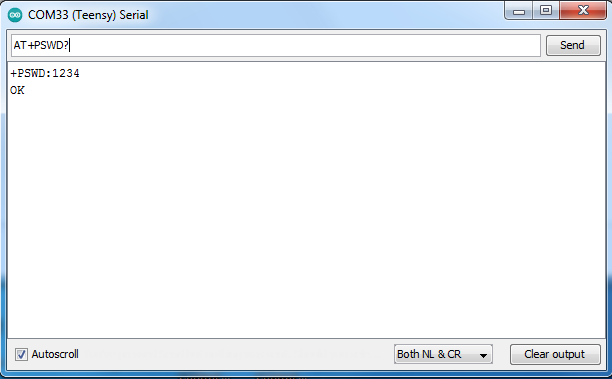
| AT+PSWD? | +PSWD:1234 OK | |
| AT+UART? | +UART=9600,0,0 OK | |
| AT+ORGL | Restore the default values |
To change values:
| AT Command | BT Response | Comments |
|---|---|---|
| AT+NAME=mygps | OK | Change BT name seen by your applications |
| AT+UART=4800,0,0 | OK | Change speed, Stop bit(1) and Parity bit(none) |
Note: Serial monitor interface and its settings:
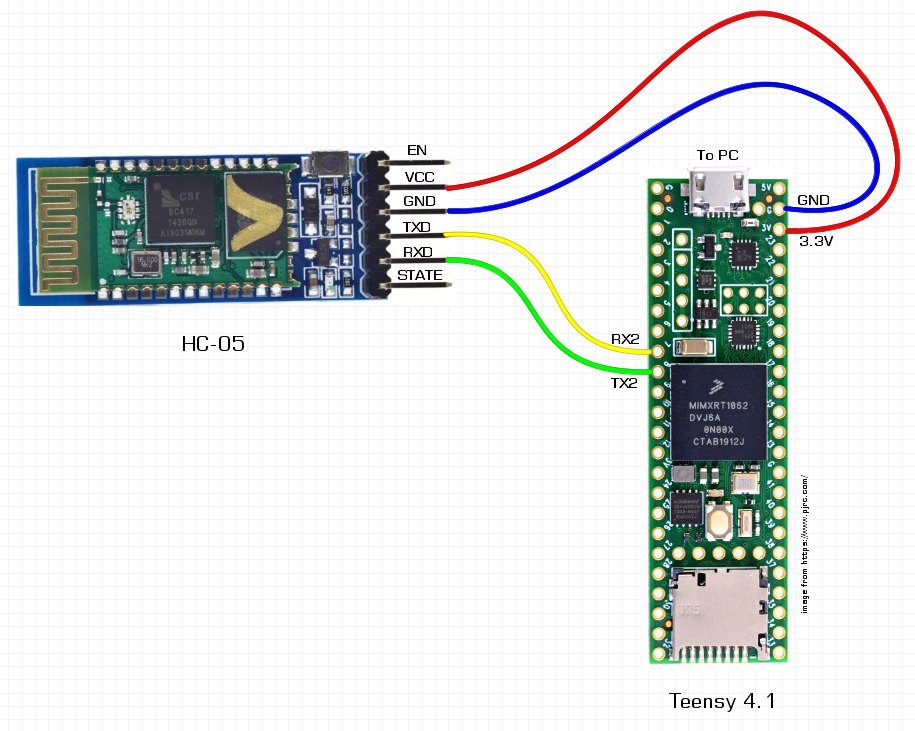
Schematic:
Note: In another project, I wanted to use these modules in Master mode. Bad luck: they didn't work. The module does accept the AT command. However, it does not switch to master. The items are advertised as being Master/Slave. I guess they loaded the wrong software or it's the wrong PCB or both! Anyway, you are never sure what you are going to get...